AI Video Outpainting
Any Video. Any Format.
Zero Cropping.
OmniFit uses generative AI to intelligently extend the edges of your video — so you can reformat for TikTok, YouTube, Instagram, and more without cutting a single frame of your original content.
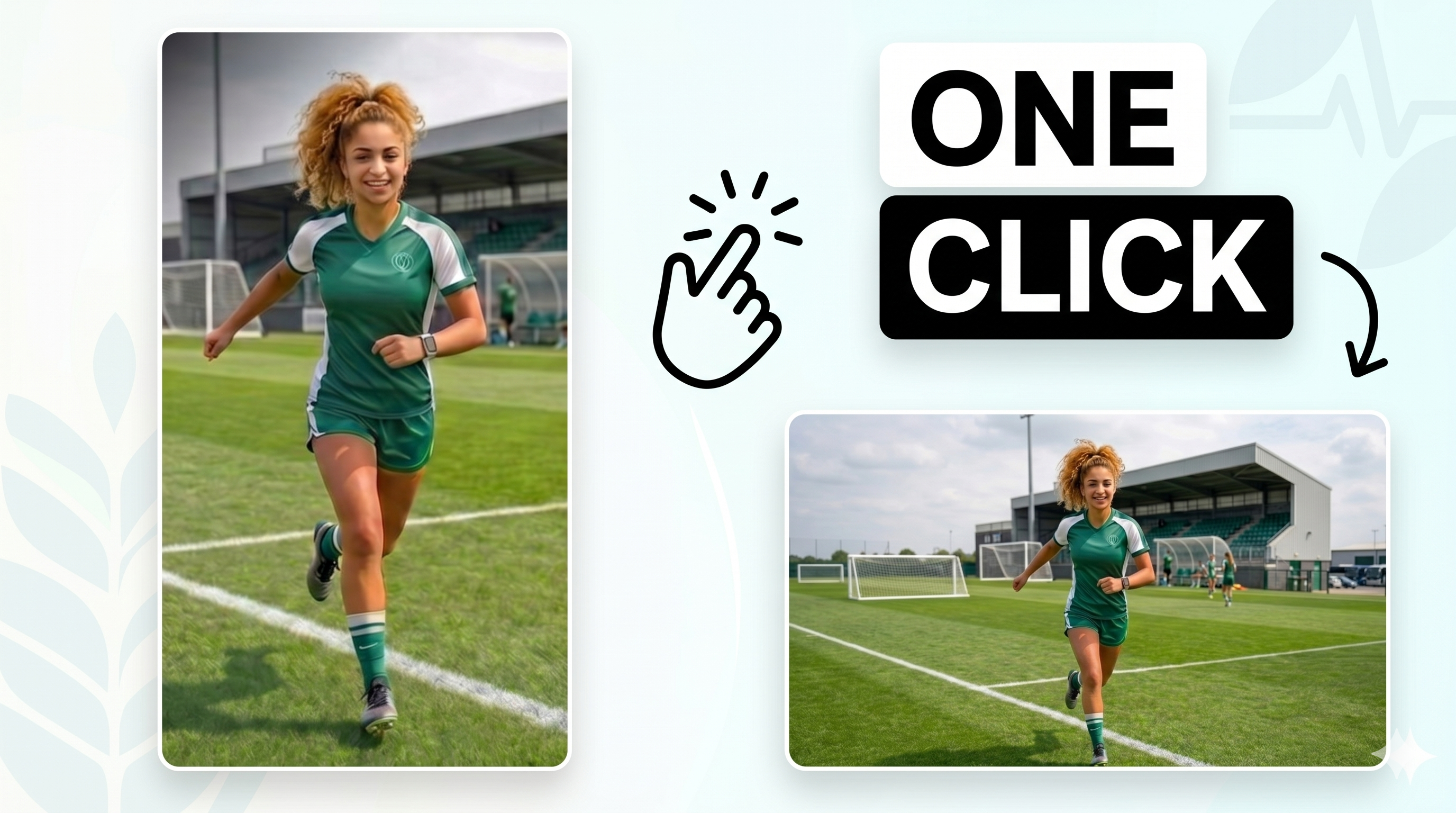
Transformation Examples
Vertical → Landscape
Expand your TikTok or Instagram Reel to a cinematic 16:9 canvas for YouTube, LinkedIn, and presentations — nothing cropped.
Landscape → Vertical
Repurpose YouTube videos and podcast clips for TikTok and Shorts without manual editing. AI fills the top and bottom.
Landscape → Square
Convert any video to a perfect 1:1 square for Instagram Feed and Twitter/X. AI expands top and bottom to fill the canvas.
Our Philosophy
Free Your Creativity.
Leave Constraints to AI.
Too many creators spend hours re-editing, re-framing, and cropping their work just to satisfy format rules — time that could be spent on what actually matters: the idea, the narrative, the craft.
"At OmniFit, we handle the constraints so you don't have to. Upload once. Let AI do the reformatting. Get back to creating."
OmniFit's generative AI doesn't just resize — it understands your content, respects your story, and extends the scene with intelligence. The result feels native to whichever platform it lands on.
Your Content, Untouched
Every pixel of your original video is preserved exactly as you shot it. AI generates only what's new — nothing is cropped, cut, or compressed.
Minutes, Not Hours
No more tedious manual re-edits in Premiere or After Effects. Upload, wait a few minutes, download. That's the whole workflow.
Context-Aware Expansion
OmniFit's model reads scene lighting, motion, and background to generate expansions that look like they were always part of your shot.
Works in Your Browser
No software to install, no plugins, no GPU required. If you can open a browser, you can use OmniFit — on any device, anywhere.
Upload & Walk Away
Enter your email and leave. We'll send you the download link the moment your full video is ready. No need to wait with the tab open.
See Before You Commit
Preview a 3-second clip of your AI-expanded video for free. Make sure you love it before we process the full length.
Process
How OmniFit Works
Three steps. No technical knowledge required. No installation needed.
Upload Your Video
Drag and drop or browse for your video file. OmniFit accepts MP4, MOV, AVI, and WebM files up to 500MB. Select whether you want a 9:16, 16:9, or 1:1 output format.
Works in your browser — no software to download.
AI Analyzes & Expands
Our generative AI model studies the content, lighting, motion, and scene context of your video, then intelligently generates new content to fill in the expanded canvas frame by frame.
Powered by state-of-the-art video generation models — results in minutes.
Preview & Download
Preview a 3-second clip of your expanded video for free. If you're happy with the result, provide your email and we'll send you the full download link straight to your inbox.
Full HD output. No watermarks.
Platform Support
Built for Every Platform
OmniFit outputs the exact formats accepted by every major platform — so you never have to worry about aspect ratios again.
Learn More
Guides and AI Video Insights
Want to go deeper on AI video generation, editing, and aspect ratio workflows? Explore practical guides and the latest AI video technology insights from OmniFit.
How-to Guide
Convert vertical video to landscape without losing content
Compare cropping, blurred backgrounds, and AI outpainting, then see why OmniFit is a cleaner way to turn mobile-first clips into 16:9 videos.
Read the guideOmniFit Blog
News and ideas for AI video creators
If you are interested in learning more about AI video generation and editing, visit our blog for the latest news, workflows, and insights about AI video technologies.
Visit the blogFAQ
Frequently Asked Questions
What is AI video outpainting?
AI video outpainting is a technique that uses generative artificial intelligence to extend the edges of a video beyond its original frame. Instead of cropping your content to fit a new aspect ratio, OmniFit intelligently generates new, contextually consistent content around your original video — so nothing gets cut out.
Can I convert a TikTok vertical video to landscape for YouTube?
Yes. OmniFit can take a 9:16 vertical video (like a TikTok or Instagram Reel) and expand it outward to fill a 16:9 landscape canvas — perfect for YouTube uploads, desktop viewers, and presentations. The AI fills in the new sides with realistic content that matches the original scene.
Can I convert a YouTube landscape video to vertical for TikTok?
Absolutely. Upload a 16:9 YouTube video and OmniFit will expand it vertically to produce a 9:16 format suitable for TikTok, Instagram Reels, YouTube Shorts, and Snapchat. Your original content stays centered and untouched.
What video formats does OmniFit support?
OmniFit accepts MP4, MOV, AVI, and WebM files up to 500MB. The output is always delivered as an MP4 file for maximum platform compatibility.
How long does processing take?
Most videos are processed within 3 to 5 minutes depending on the length and resolution of your file. You can enter your email on the processing page and we'll notify you the moment your video is ready — no need to wait with the tab open.
Is OmniFit free to use?
You can upload a video and receive a 3-second preview of the outpainted result completely free. If you're happy with the result, we'll process the full video and send you the download link.
Will the AI-generated content look realistic?
OmniFit uses state-of-the-art video generation models that analyze every frame of your clip to produce smooth, temporally consistent expansions. Results look natural for most outdoor scenes, interviews, product videos, and B-roll content.
Ready to Expand
Your Creative Canvas?
Upload your first video in seconds. No account required.
Get Started Free